01Hardware
Luckfox Pico 86Panel W — a wall-mount HMI built around Rockchip's RV1106, running Buildroot Linux on uClibc. No Android runtime; the original Compose UI was rebuilt on LVGL.
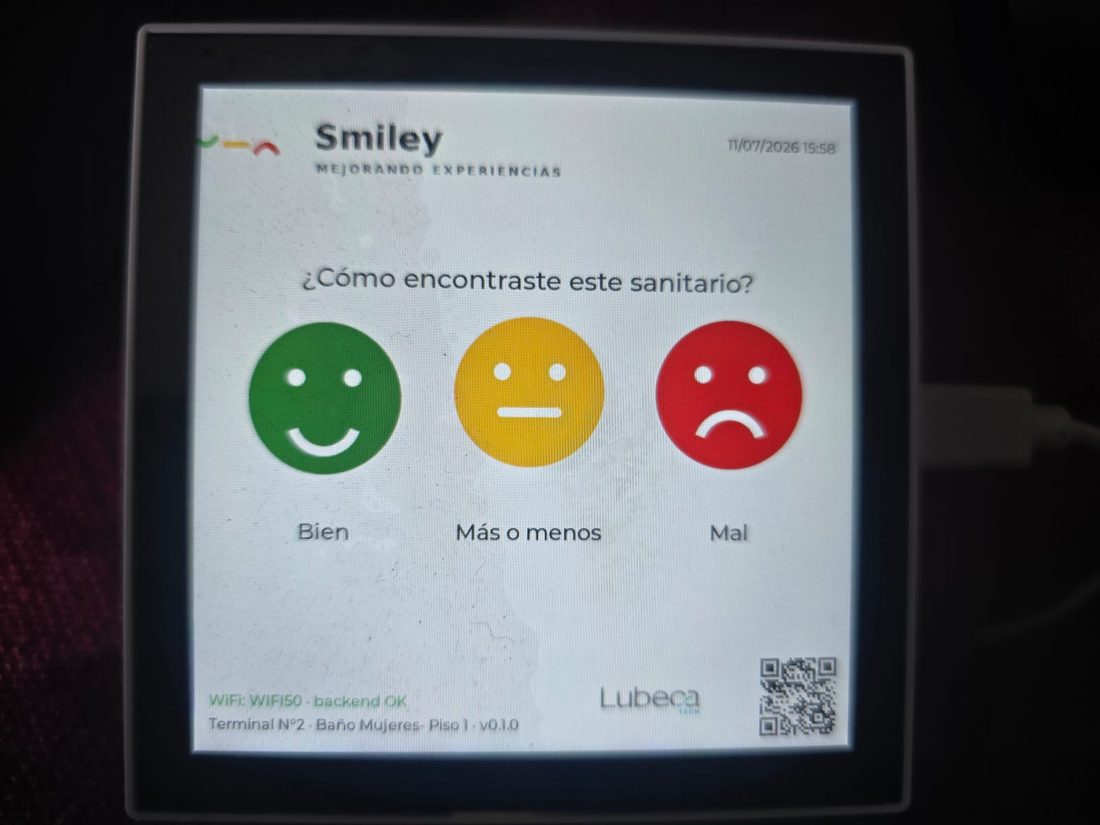
backend Ok status line. Native LVGL, no Android.| Item | Value |
|---|---|
| SoC | Rockchip RV1106G3 — single-core Cortex-A7, RISC-V co-proc, NPU |
| RAM | 256 MB DDR3L (~236 MB usable) |
| Display | 4" IPS, 720×720, 32 bpp — /dev/fb0 |
| Touch | Goodix capacitive, I²C — /dev/input/event0 |
| Audio | RV1106 internal codec (I²S) — /dev/snd/pcmC0D0p |
| Camera | None (SoC has an ISP but this panel has no sensor) |
| Connectivity | WiFi, Ethernet RJ45, USB-C gadget (RNDIS + ADB), RS485, 2× relays |
| Power | USB-C 5V (bench) or 6–30 V DC terminal (wall install) |
Partitions (eMMC)
| Mount | FS | Size | Use |
|---|---|---|---|
/ | ext4 rw | 5.8 GB | rootfs, app binary /root/caritas |
/userdata | ext4 rw | 238 MB | persistent data — DB, config, CA file |
/tmp | tmpfs | 118 MB | RAM — logs (reset on reboot) |
The rootfs and /userdata are read-write and journaled — changes survive reboots and the filesystem is crash-safe on power loss.
02Architecture
A single process (caritas) with two threads:
- UI thread (
main.c) — the LVGL render loop; never blocks on I/O. - Network thread (
net.c) — all HTTP/TLS. A bad or dead network can never freeze the display.
They share the SQLite connection (compiled THREADSAFE=1) and communicate through a condition variable (net_request_sync) and a poll flag (net_pair_state).
Modules (src/)
| File | Responsibility |
|---|---|
main.c | init (fbdev, LVGL, DB, TZ), start UI + network thread, run loop |
ui.c | all screens + state machine, technical menu, chrome, brightness, sound |
faces.c | draws the three faces and the Smiley brand mark |
fbdev.c / evdev.c | minimal framebuffer display + touch pointer drivers |
db.c | SQLite: opinion queue, config cache, reasons — power-loss hardened |
http.c | HTTP/1.1 + HTTPS (mbedTLS, cert verify), chunked decode, connect timeout |
sync.c | sync_run (push/drain/deltas) + prov_vincular (pairing) |
net.c | network thread, backend target, sync scheduling |
util.c | client_uuid (kernel RNG) + ISO-8601 timestamp |
Vendored dependencies (third_party/)
All compiled with the SDK's uClibc toolchain — no runtime library surprises.
- sqlite — offline queue + config
- cjson — JSON build/parse
- mbedtls 3.6.7 LTS — TLS client
- bcrypt (crypt_blowfish) — verify the technical PIN against the backend hash
03Build environment
The Luckfox SDK only supports Ubuntu 22.04 x86_64. On Windows that means WSL2.
- WSL2 distro
Ubuntu-22.04(neededwsl --updateto expose versioned names), userpi. - SDK cloned at
~/luckfox-pico— an external dependency, not vendored in this repo. - Cross toolchain:
arm-rockchip830-linux-uclibcgnueabihf. - LVGL v8.2 source comes from the SDK;
lv_conf.his our config (32-bit colour, Latin fonts, QR, image widget).
04Building & deploying
From the repo root, inside WSL:
make -j16                                    # build/caritas — ARM uClibc ELF
adb push build/caritas /root/caritas
adb shell 'chmod +x /root/caritas; killall caritas' # watchdog relauncheslv_conf.h, force-rebuild the LVGL archive — rm -rf build/lvgl build/liblvgl.a && make -j16. The Makefile doesn't track that header.Autostart & watchdog
/etc/init.d/S99smiley runs a watchdog loop with escalating backoff on crash loops, and sets a link-local IP on usb0 for admin SSH. The factory demo (86UI_demo) is disabled by moving S99lvgl out of /etc/init.d — busybox rcS runs anything matching S*, so a .disabled suffix isn't enough.
05Runtime behaviour
Opinión flow
Ported faithfully from the Android OpinionViewModel:
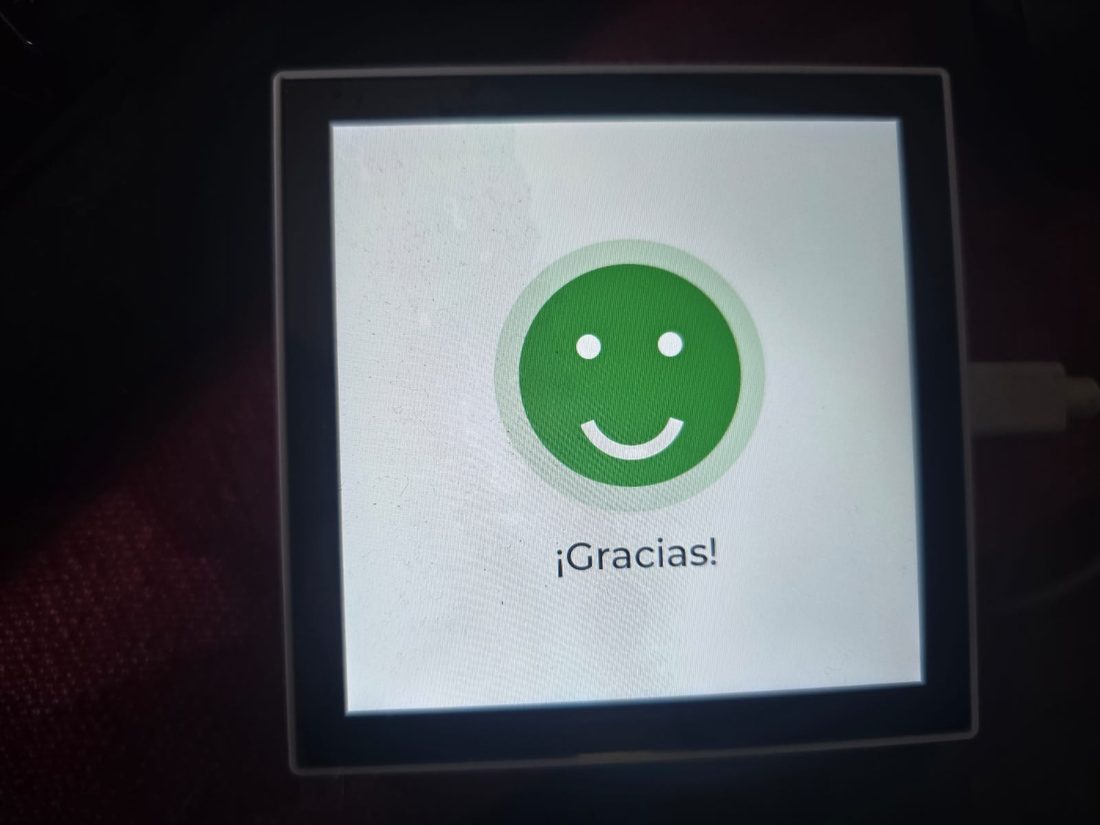
Caritas  --tap Bien / Más o menos------------->  Gracias
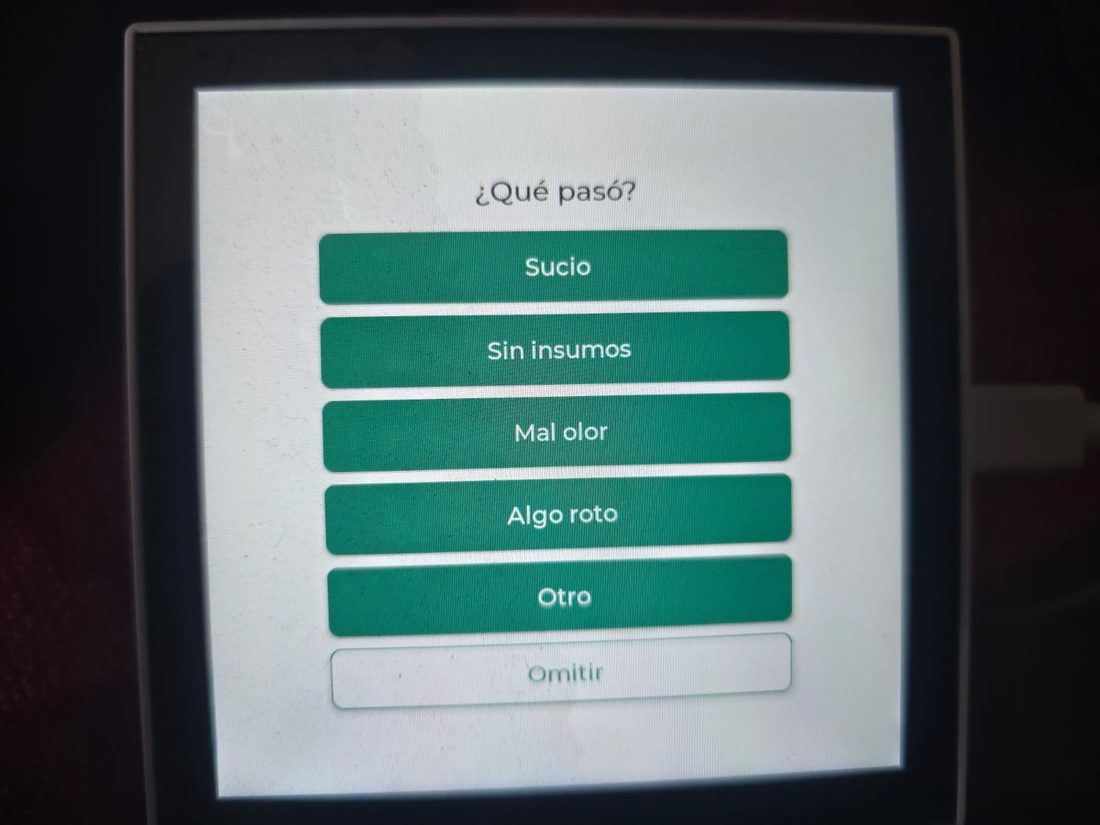
Caritas  --tap Mal (mostrar_motivos)--------->  Motivos --reason / omitir-->  Gracias
                                                Motivos --10s timeout------>  Gracias
Gracias  --2s-->  Caritas     (input locked until 3s from the tap)
client_uuid + ts_local_device are generated at tap time, before any I/O, and the opinion is fsync'd to SQLite before "¡Gracias!" shows — so a visible thank-you always means a persisted vote.
Idle chrome & extras
- Smiley lockup, live clock (Argentina −03), diagnostic line, QR, and a tri-colour WiFi indicator (red = no WiFi, blue = associated, green = backend reachable).
- Attract mode: the three faces do a gentle staggered bob to invite taps.
- Brightness: full during 07–22h, dimmed at night — no idle-dimming, since an idle kiosk must stay inviting.
- Sound: a soft 420 Hz eased beep on tap. The codec output path is enabled at boot (it starts muted).
Technical menu (hidden)
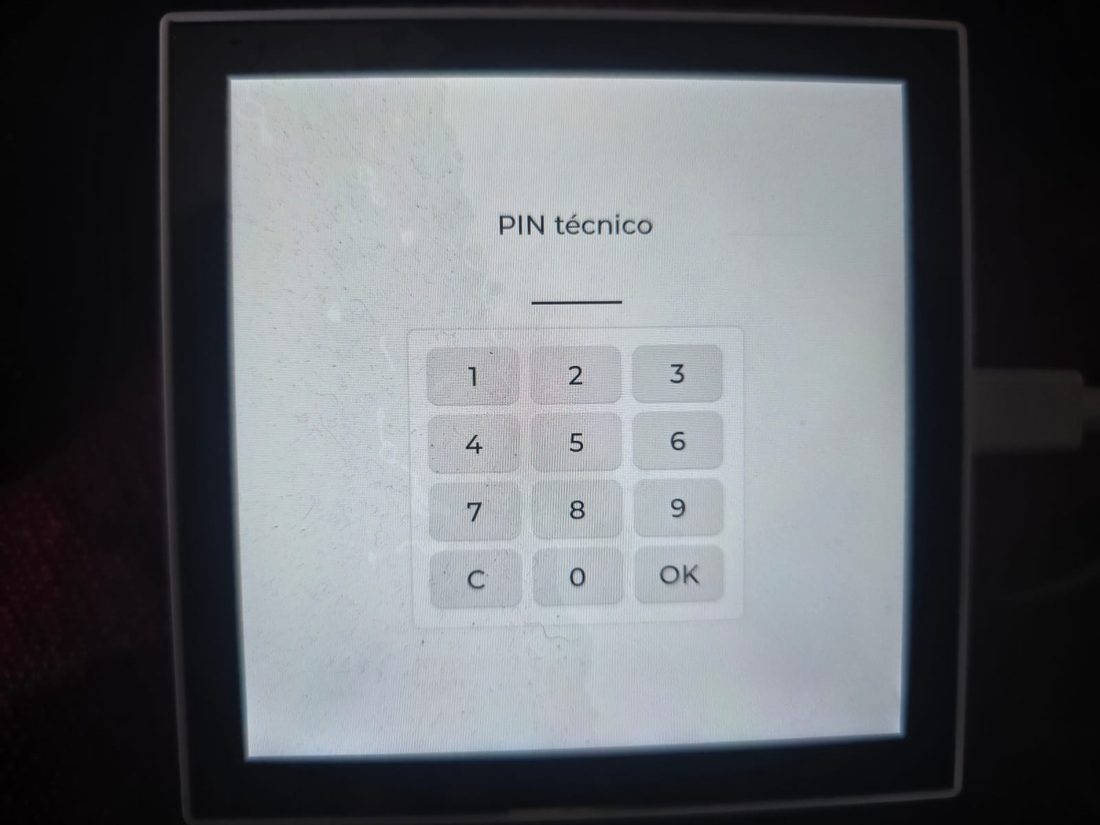
10 taps on the Smiley logo within 2.5s → PIN → menu: brightness, sound, WiFi, backend server URL, re-pair, restart.
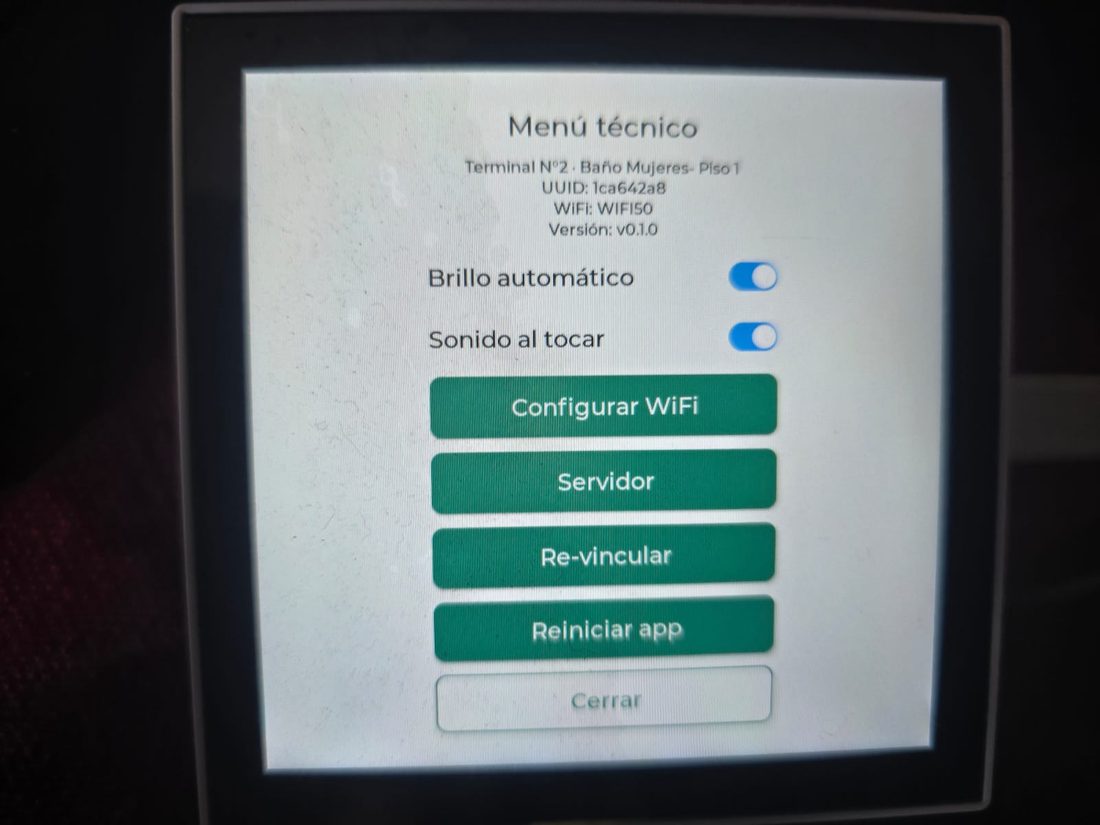
Kiosk hardening
- Watchdog restart on crash; nightly reboot at 04:00 (clears the tmpfs log + RAM).
- Quiet 24/7 logging — sync only logs when it drains opinions.
- Votes durable across power loss (
synchronous=FULL+journal_mode=TRUNCATE+ ext4 journal). Verified with a real physical power cut.
06Sync protocol
Speaks SYNC_PROTOCOL_SMILEY (/api/v1/smiley/*), pull-based JSON, auth via X-Device-Uuid + X-Api-Key headers.
| Endpoint | Purpose |
|---|---|
GET /ping | public health / connection check |
POST /vincular | pairing with a one-time code → returns device_uuid, api_key, identity |
POST /sync | push pending opinions, apply config/reason deltas, drain the acked ones |
GET /estado | light last-cleaning refresh |
The backend is behind Cloudflare and responds chunked, so the client decodes chunked transfer-encoding.
07Configuration
config_local (SQLite key/value)
| Key | Set by | Meaning |
|---|---|---|
device_uuid, api_key | vincular | device credentials |
pin_tecnico_hash | sync (backend) | bcrypt $2a$ hash for the technical PIN |
last_sync | sync | server timestamp of the last sync |
auto_brillo | menu | brightness schedule on/off (default on) |
sonido_local | menu | tap beep on/off (default on) |
auto_reboot | manual | set 0 to disable the nightly reboot |
Files (/userdata/)
| File | Purpose |
|---|---|
smiley.db | the SQLite database |
backend.conf | override the backend URL (http:// or https://); absent = production |
cacert.pem | override the TLS CA bundle; absent = embedded bundle |
08Admin recipes
SSH / console
dropbear listens on :22. Since the panel and your laptop are usually on different WiFi subnets, the reliable path is the USB cable:
ssh root@169.254.148.50 # link-local set on usb0 at bootadb shell over USB also works. Change the default root password in production (passwd).
Point at a local / test backend (no TLS)
Menu → Servidor → type http://<ip>:<port> (plain http:// skips TLS). Or by file:
echo "http://192.168.0.10:8080" > /userdata/backend.conf
killall caritas
# restore production:  rm /userdata/backend.conf && killall caritas
Refresh the TLS CA bundle (~yearly, or if sync breaks on cert errors)
curl -o cacert.pem https://curl.se/ca/cacert.pem            # on your PC
scp cacert.pem root@169.254.148.50:/userdata/cacert.pem     # to the device
ssh root@169.254.148.50 killall caritas                     # apply
Revert to the embedded bundle: rm /userdata/cacert.pem && killall caritas.
WiFi & PIN
WiFi: menu → Configurar WiFi → pick a network → keyboard for the password. PIN: verified against the backend's bcrypt hash when present, else pin_local, else 1234.
09Security
- TLS verification is on (
VERIFY_REQUIRED) — a forged/self-signed cert is rejected (verified againstexpired.badssl.com/self-signed.badssl.com). - PIN is checked with real bcrypt against the backend hash.
api_keyis stored in plaintext on the eMMC — the RV1106 has no hardware keystore. Mitigable, not eliminable without a secure element.- The USB link-local + open SSH is convenient for admin but means anyone with the cable and root password has a shell — change the password and treat physical access accordingly.
10Troubleshooting
| Symptom | Cause / fix |
|---|---|
| SSH over WiFi times out | panel & laptop on different subnets — use the USB IP 169.254.148.50 |
| WiFi indicator red / blue | red = not associated; blue = associated but backend unreachable |
sync: error de red | network/backend down; recovers automatically |
| No sound | codec output path — check amixer -c 0 and that a speaker is connected |
Build: $VAR empty via wsl -- bash -c | MSYS drops variables — use literal paths; MSYS_NO_PATHCONV=1 for adb device paths |
adb push then permission denied | push resets the exec bit — chmod +x after every push |
Logs live in /tmp/smiley.log (tmpfs, reset on reboot): backend:, ping:, vincular:, sync:, db: lines.
11Known issues
POST /sync returns OK but doesn't persist the terminal's ultimo_sync. The reference Android tablet shows the same symptom, so the bug is in SmileySyncService, not here.Future: hardware watchdog (/dev/watchdog not exposed), colour calibration, backend-pushed CA updates.